Installation
Get StoryFlow Editor installed on your system in just a few minutes.
System Requirements
Before installing StoryFlow Editor, make sure your system meets these minimum requirements. StoryFlow Editor is built with Electron and runs as a native desktop application.
Minimum Requirements
- Operating System: Windows 10/11 (64-bit), macOS 10.15+ (Apple Silicon and Intel), or Linux (64-bit, AppImage)
- RAM: 4GB minimum (8GB recommended for larger projects)
- Disk Space: 500MB for installation, additional space for your projects
- Display: 1280x720 resolution minimum (1920x1080 recommended)
- Internet: Required for initial download and Steam authentication
Linux Users
Linux support is available via AppImage distribution. Download from Steam or itch.io and run the AppImage file directly.
Download
StoryFlow Editor is available on two platforms: Steam and itch.io. Choose the platform that works best for you.
Steam (Recommended)
Steam provides automatic updates and handles installation automatically through the Steam client, making it the easiest way to keep StoryFlow Editor up to date.
itch.io (Manual Installation)
Prefer to download directly? StoryFlow Editor is also available on itch.io. This version requires manual download and installation, but doesn't require a Steam account. You'll need to manually download and install updates when new versions are released.
Which Platform Should I Choose?
- Choose Steam if: You want automatic updates and the easiest installation experience.
- Choose itch.io if: You prefer direct downloads or want to support indie distribution platforms.
Installation is Automatic
Steam handles installation automatically. For itch.io, simply extract the files (Windows), drag to Applications (macOS), or run the AppImage (Linux). All platforms are fully supported.
First Launch
Once installation is complete, launch StoryFlow Editor. The application will open to the Projects Window, your central hub for managing interactive story projects.
- Steam: Click the "Play" button in your Steam library.
- itch.io (Windows): Run
storyflow-editor.exefrom the extracted folder. - itch.io (macOS): Open StoryFlow Editor from your Applications folder or Launchpad.
- itch.io (Linux): Make the AppImage executable (
chmod +x) and run it directly.
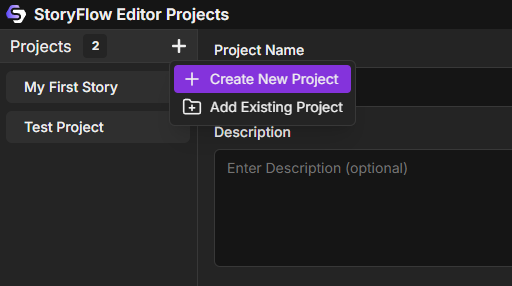
On first launch, the projects list will be empty. This is normal! You're ready to start creating.
Ready to Get Started?
Installation complete! Head over to the Quick Start Guide to create your first interactive story in just 5 minutes.